IPTV set-top boxes: what to buy in Canada

A set-top box turns any television with an HDMI port into an IPTV receiver. BorealTV does not sell hardware — we sell the streaming line — but the box you choose has a real effect on how well the service runs, so this page sets out what works, what does not, and why.

IPTV set-top boxes compatible with BorealTV in Canada
The basics

What an IPTV box actually is

An IPTV set-top box is a small dedicated computer optimised for television. It connects to your TV over HDMI and to your network over Wi-Fi or ethernet, then decodes video streams pulled from secure servers and renders them on screen. Unlike cable, there is no installation appointment, no coaxial run and no contract tying you to the hardware.

Boxes run one of two operating systems. Linux-based boxes — the MAG family is the best known — do one job and do it efficiently, with less background overhead and fewer things to go wrong. Android-based boxes are more flexible: they run other apps alongside IBO Player and tend to have better hardware for the money.

Most advanced boxes also support pause, rewind and time-shift on live channels, and the remote behaves like an ordinary TV remote. The practical difference from cable is price: a one-off box purchase replaces an indefinite monthly rental of CA$8 to CA$20 per receiver. The full comparison with cable is on the home page.

The options

Four ways to run BorealTV on your television

MAG Linux boxes

MAG Linux boxes

CA$150–$210 typical

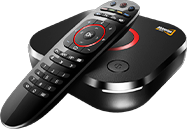
The MAG540w3, MAG544w3 and similar models run a stripped-down Linux built specifically for IPTV. Extremely stable, low overhead, and the remote layout is designed for channel surfing rather than app browsing. The trade-off is that they do nothing else — no Netflix, no YouTube, no app store.

  • Best-in-class playback stability
  • Built-in Wi-Fi on w3 models
  • Purpose-built IPTV remote
  • No general-purpose apps
Android set-top boxes

Android set-top boxes

CA$90–$220 typical

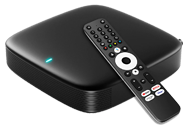
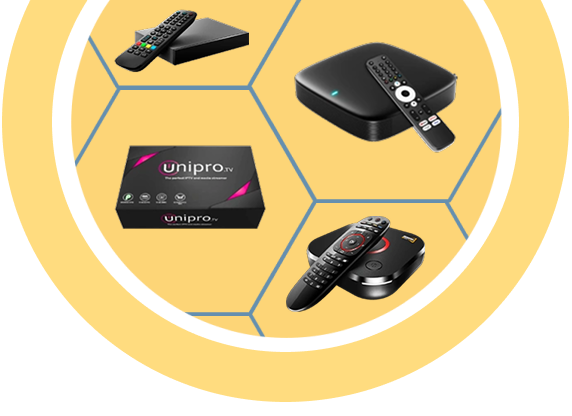
Android boxes such as the MAG555, Unipro and the wider Android TV market run IBO Player alongside every other streaming app you use. More processing power per dollar than Linux boxes and a familiar interface, at the cost of slightly more background activity.

  • Runs IBO Player plus other apps
  • Better hardware per dollar
  • Google Play or sideload install
  • Choose 2GB RAM or more
Amazon Fire TV Stick

Amazon Fire TV Stick

CA$45–$90 typical

The cheapest credible route. IBO Player is not in the Amazon store so it installs through the Downloader utility, which sounds harder than it is — the setup guide covers it step by step. The 4K Max generation handles 4K streams comfortably; older Lite models struggle.

  • Lowest entry cost
  • Pocket-sized, travels well
  • Needs Downloader to install
  • Pick 4K Max for 4K channels
Samsung and LG smart TVs

Samsung & LG smart TVs

No extra hardware

If your television is a recent Samsung or LG, you may need nothing at all. IBO Player is published directly in the LG Content Store and Samsung Apps store, so installation is a normal app install with no side-loading. Performance on 2020-and-newer sets is generally good.

  • Zero additional hardware
  • Normal store installation
  • One remote instead of two
  • Older sets may lack the app
Choosing

How to pick between them

You want maximum reliability

Buy a MAG Linux box. Fewer moving parts means fewer failure modes, and for a television that is only ever used for live TV it is the calmest option available.

You want one box for everything

Buy an Android box with at least 2GB of RAM. It runs IBO Player alongside your other streaming apps and you keep a single input on the TV.

You want the cheapest working setup

Buy a Fire TV Stick 4K Max. It costs a fraction of a dedicated box and performs well once IBO Player is installed via Downloader.

You already own a recent Samsung or LG

Buy nothing. Search the built-in app store for IBO Player and install it directly. Add hardware only if performance disappoints.

Whichever you choose, the app is the same: IBO Player.

Warning

What to avoid when buying

Counterfeit and cloned set-top boxes are widespread on online marketplaces, particularly cloned MAG units. They typically look correct, arrive with convincing packaging, and then fail in ways that cannot be fixed from our side — playback stops after a firmware check, the device key rejects activation, or the unit dies within months.

Buy from an authorised distributor or an established local retailer. Insist on a hardware warranty. If a listed price is dramatically below every other seller for the same model number, that is the signal, not a bargain.

Also avoid the very cheapest generic Android boxes with 1GB of RAM and no brand name. They technically run IBO Player, but the interface stutters, 4K streams drop frames, and the experience gets blamed on the IPTV service when the hardware is at fault.

Genuine MAG IPTV set-top box
Requirements

What your box and connection need

HDMI output

Any TV with an HDMI port works. Older televisions can use an HDMI-to-AV converter and modern boxes still function normally.

25 Mbps for 4K

Real measured throughput, not the number on your bill. HD needs 10–15 Mbps. Add headroom for other devices in the house.

Ethernet where possible

A wired connection removes the single largest variable in streaming quality. If the box is near the router, use the cable.

2GB RAM minimum on Android

Below that, menu navigation stutters and 4K decoding becomes unreliable. 4GB is comfortable and now inexpensive.

Unsure about your connection? The FAQ sets out the required speeds.

Have the box, need the service?

BorealTV supplies the streaming line that makes any of these boxes useful. Order the CA$10.99 intro month and we will help you install IBO Player on whichever hardware you chose.

Try 1 month — CA$10.99 Ask which box suits you